mirror of
https://github.com/Molunerfinn/PicGo.git
synced 2026-10-20 00:15:41 +00:00

130 lines
9.2 KiB
Markdown
130 lines
9.2 KiB
Markdown
# PicGo 2.4.0 Changelog
|
||
|
||
## Features
|
||
- Add filename display in the gallery (#1050)
|
||
- Add default placeholders when images/URLs cannot be shown in the gallery or tray window (#1050)
|
||

|
||
- Add filename display in the macOS tray window (#1054)
|
||
- Allow multiple configs per uploader type and choose one for upload (thanks @STDSuperman, #1016)
|
||

|
||
- Allow the uploader selection menu to pick a specific config entry for that uploader type
|
||

|
||
- Add Dock icon visibility option (#1045)
|
||
<img width="787" alt="image" src="https://github.com/Molunerfinn/PicGo/assets/12621342/bb9492f1-6522-45ce-ae5d-c614901d8b06" />
|
||
- Add PicGo Repair Toolbox for self-diagnosis
|
||
<img width="324" alt="image" src="https://github.com/Molunerfinn/PicGo/assets/12621342/98cf6e64-7313-4ebe-83d0-aa86e4514109" />
|
||
- Add option to encode/escape output URLs (#731)
|
||
<img width="775" alt="image" src="https://github.com/Molunerfinn/PicGo/assets/12621342/6e0c13dd-3404-4b07-9c99-412321835b27" />
|
||
- Support drag-and-drop uploads for arbitrary file formats (#1052)
|
||
- Tencent COS: add Endpoint and Intelligent Compression settings (thanks @palmcivet @yc910920)
|
||

|
||
- Add Markdown-rendered tips for uploader config (see tcyun uploader config)
|
||

|
||
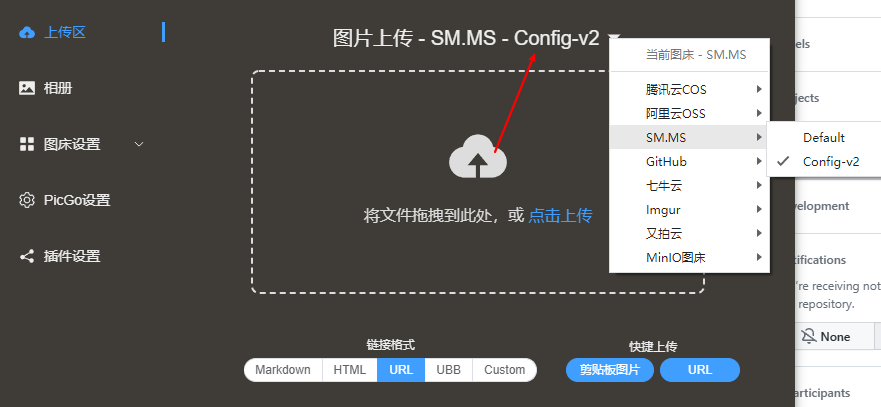
- Show the active uploader config name in the upload screen
|
||
|
||
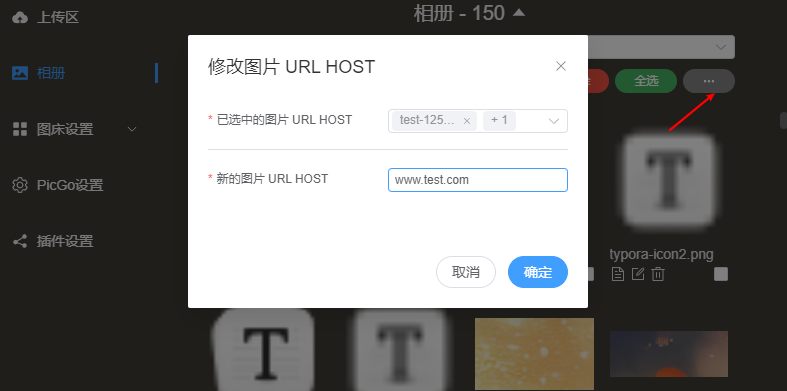
- Gallery toolbar: bulk replace image URL host (#875)
|
||
Note: select images first; you can filter by uploader; e.g., replace `https://www.a.com/...` with `https://www.b.com/...`
|
||
|
||
- Add “Startup Mode”: Silent (default) / Main Window; Windows/Linux also support Mini Window (#915)
|
||
<img width="577" alt="image" src="https://github.com/Molunerfinn/PicGo/assets/12621342/7e63bb5c-44b0-480e-824f-3c2edbed4fbb" />
|
||
- PicGo Server: support multipart form uploads (field `files`, #428, thanks @happy-game)
|
||
<img width="951" alt="image" src="https://github.com/user-attachments/assets/14244f1d-60f5-487f-bde6-6d0e009645fb" />
|
||
|
||
## Bug Fixes
|
||
- Fix Windows context-menu config script generation (#1019)
|
||
- Fix custom link URL encoding (#1112)
|
||
- Fix potential logging dead loop (#1101)
|
||
- Fix drag-to-tray upload error (#1107)
|
||
- Fix filename encoding (#1121)
|
||
- Prevent errors on GitHub uploads with duplicate filenames
|
||
- Fix beta.2 style issues
|
||
- Fix slow filename display in the rename window (#1130)
|
||
- Fix “open config file” actually opening the log file (#1163)
|
||
- Fix plugin config dialog not reading/saving correctly
|
||
- Fix inability to add new uploader configs (created as edit) (#1198, #1196)
|
||
- Fix macOS context menu disappearing (thanks @muwoo, #1179)
|
||
- Fix macOS tray window flashing after right-click (thanks @QThans, #1217)
|
||
- Fix uploader config page not scrollable when many fields (#1237)
|
||
- Fix Tencent COS URL encoding (#1265)
|
||
- Fix plugin list search not working (#1297)
|
||
- Fix clipboard filename losing “seconds” (#1293)
|
||
- Fix macOS tray copy-link failing on click (#1280, #1210)
|
||
- Fix auto-copy URL toggle not turning off (#1294, thanks @happy-game)
|
||
- Fix Wayland clipboard image upload issue (#1261, thanks @happy-game)
|
||
- Fix URL uploads with Chinese characters being encoded in filenames (#1339)
|
||
|
||
## Other
|
||
- COS distribution paused due to malicious traffic charges
|
||
- Upgrade to Vue3
|
||
- Refactor parts of the code
|
||
- Refactor parts of the code (again)
|
||
- Add more detailed hotkey logs (#1031)
|
||
- Known issue: some button styles were incorrect (fixed in later betas)
|
||
- Update README scoop installation section (thanks @wuhang2003)
|
||
|
||
----------
|
||
|
||
## Features
|
||
- 新增 相册页新增文件名展示,参考 #1050
|
||
- 新增 相册中和顶部栏窗口中无法展示的图片或者 url 将会展示默认图片,参考#1050
|
||

|
||
- 新增 macOS 顶部栏窗口新增文件名展示,参考 #1054
|
||
- 新增 同种类型图床支持多份配置,上传时可以指定某一份配置进行上传。感谢 @STDSuperman ,参考 #1016
|
||

|
||
- 新增 选择图床的菜单可以支持选择该图床类型某一项具体配置
|
||

|
||
- 新增 显示 dock 栏图标选项,参考 #1045
|
||
<img width="787" alt="image" src="https://github.com/Molunerfinn/PicGo/assets/12621342/bb9492f1-6522-45ce-ae5d-c614901d8b06" />
|
||
- 新增 PicGo 修复工具箱,可以自行排查一些问题
|
||
<img width="324" alt="image" src="https://github.com/Molunerfinn/PicGo/assets/12621342/98cf6e64-7313-4ebe-83d0-aa86e4514109" />
|
||
- 新增 对输出的 URL 进行 encode 转义的选项,参考 #731
|
||
<img width="775" alt="image" src="https://github.com/Molunerfinn/PicGo/assets/12621342/6e0c13dd-3404-4b07-9c99-412321835b27" />
|
||
- 新增 支持拖拽任意格式文件上传,参考 #1052
|
||
- 新增 腾讯云 COS 支持 `Endpoint` 配置 和 `极智压缩` 配置。 感谢 @palmcivet @yc910920 的贡献!
|
||

|
||
- 新增 `tips` 配置渲染的支持,可以动态渲染 Uploader config 的 tips。支持 markdown 格式。参考 [tcyun uploader config](https://github.com/PicGo/PicGo-Core/blob/dev/src/plugins/uploader/tcyun.ts#L280)
|
||

|
||
- 新增 上传界面展示当前图床使用的配置名
|
||

|
||
- 新增 相册页工具栏,目前内置 `批量修改图片 URL HOST 的功能` 。参考 #875
|
||
注意:需要先选中指定的图片,然后会根据已选中的图片进行修改,你可以通过图床筛选功能只筛选出需要修改的图片
|
||
例如,你有一批图片都是 `https://www.a.com/...` 打头的 URL,你想把 `www.a.com` 批量修改成 `www.b.com` ,就可以用这个功能
|
||

|
||
- 新增 `启动模式`,可以设置启动的时候是否要打开窗口。全平台支持 `静默启动`(默认值) & `打开主窗口`,Windows 和 Linux 额外支持 `打开 Mini 窗口`。参考 #915
|
||
<img width="577" alt="image" src="https://github.com/Molunerfinn/PicGo/assets/12621342/7e63bb5c-44b0-480e-824f-3c2edbed4fbb" />
|
||
- 新增 PicGo Server 支持表单形式上传图片。参考 #428 ,感谢 @happy-game
|
||
表单字段为 files。参考截图:
|
||
<img width="951" alt="image" src="https://github.com/user-attachments/assets/14244f1d-60f5-487f-bde6-6d0e009645fb" />
|
||
|
||
## Bug Fixes
|
||
- 修复 windows 右键菜单配置生成脚本,参考 #1019
|
||
- 修复 自定义链接 URL encode 问题,参考 #1112
|
||
- 修复 日志写入可能存在死循环问题,参考 #1101
|
||
- 修复 拖拽文件到顶部栏图标报错问题,参考 #1107
|
||
- 修复 文件名 encode 问题。参考 #1121
|
||
- 修复 GitHub 重名文件上传不再报错
|
||
- 修复 beta.2 版本部分样式问题
|
||
- 修复 重命名窗口某些情况下显示文件名过慢的问题,参考 #1130
|
||
- 修复 打开配置文件打开的是日志文件的 bug,参考 #1163
|
||
- 修复 插件配置弹窗打开后无法正确读取和保存配置的问题
|
||
- 修复 无法新增图床配置的问题(新增变成了编辑)。参考 #1198,#1196
|
||
- 修复 macOS 右键菜单消失问题。感谢 @muwoo 。参考 #1179
|
||
- 修复 macOS 顶部栏窗口右键之后一闪而过的问题。 感谢 @QThans。 参考 #1217
|
||
- 修复 图床配置页面配置项过多时无法滚动到底部的问题。参考 #1237
|
||
- 修复 腾讯云 COS URL encode 的问题。参考 #1265
|
||
- 修复 插件列表无法搜索的问题。 参考 #1297
|
||
- 修复 剪贴板文件名丢失 `秒` 的问题。 参考 #1293
|
||
- 修复 macOS 顶部栏点击图片复制链接失效的问题。 参考 #1280 , #1210
|
||
- 修复 自动复制 URL 这个开关无法被关闭的问题。参考 #1294 ,感谢 @happy-game
|
||
- 修复 wayland 里无法使用剪贴板图片的问题。参考 #1261 ,感谢 @happy-game
|
||
- 修复 直接通过 URL 上传图片的时候,带有汉字的 URL 上传后,文件名被 encode 的问题。 参考 #1339
|
||
|
||
## Other
|
||
- 由于 PicGo 存储的 COS 空间被恶意刷大量流量导致欠费,暂时停止 COS 渠道的 PicGo 分发
|
||
- 更新至 Vue3
|
||
- 重构部分代码
|
||
- 重构部分代码
|
||
- 补充更详细的快捷键相关日志,参考 #1031
|
||
- 已知问题:部分按钮样式有点问题,下个版本会修复
|
||
- 更新 README中的 scoop 下载安装的部分,感谢 @wuhang2003
|