mirror of
https://github.com/Molunerfinn/PicGo.git
synced 2026-10-20 00:15:41 +00:00

185 lines
9.4 KiB
Markdown
185 lines
9.4 KiB
Markdown
<div align="center" markdown="1">
|
||
<sup>Special thanks to:</sup>
|
||
<br>
|
||
<a href="https://go.warp.dev/picgo">
|
||
<img alt="Warp sponsorship" width="400" src="https://raw.githubusercontent.com/warpdotdev/brand-assets/refs/heads/main/Github/Sponsor/Warp-Github-LG-03.png">
|
||
</a>
|
||
|
||
### [Warp, the intelligent terminal for developers](https://go.warp.dev/picgo)
|
||
[Available for macOS, Linux, & Windows](https://go.warp.dev/picgo)<br>
|
||
|
||
</div>
|
||
|
||
<div align="center" markdown="1">
|
||
<sup>Sponsored by:</sup>
|
||
<br>
|
||
<a href="https://console.neon.tech/app/?promo=PicGo">
|
||
<picture>
|
||
<source media="(prefers-color-scheme: dark)" srcset="https://neon.com/brand/neon-logo-dark-color.svg">
|
||
<source media="(prefers-color-scheme: light)" srcset="https://neon.com/brand/neon-logo-light-color.svg">
|
||
<img alt="Neon sponsorship" width="400" src="https://neon.com/brand/neon-logo-dark-color.svg">
|
||
</picture>
|
||
</a>
|
||
|
||
### [Fast Postgres Databases for Teams and Agents](https://console.neon.tech/app/?promo=PicGo)
|
||
|
||
</div>
|
||
|
||
|
||
---
|
||
|
||
[中文](./README_zh-CN.md) | **English**
|
||
|
||
<div align="center">
|
||
<img src="https://raw.githubusercontent.com/Molunerfinn/test/master/picgo/New%20LOGO-150.png" alt="PicGo Logo">
|
||
<h1>PicGo</h1>
|
||
<h3>The Ultimate Image Uploader for Efficient Creators</h3>
|
||
|
||
<p align="center">
|
||
<a href="https://github.com/Molunerfinn/PicGo/actions">
|
||
<img src="https://img.shields.io/badge/code%20style-standard-green.svg?style=flat-square" alt="">
|
||
</a>
|
||
<a href="https://github.com/Molunerfinn/PicGo/actions">
|
||
<img src="https://github.com/Molunerfinn/PicGo/actions/workflows/main.yml/badge.svg" alt="">
|
||
</a>
|
||
<a href="https://github.com/Molunerfinn/PicGo/releases">
|
||
<img src="https://img.shields.io/github/downloads/Molunerfinn/PicGo/total.svg?style=flat-square" alt="">
|
||
</a>
|
||
<a href="https://github.com/Molunerfinn/PicGo/releases/latest">
|
||
<img src="https://img.shields.io/github/release/Molunerfinn/PicGo.svg?style=flat-square" alt="">
|
||
</a>
|
||
<a href="https://github.com/PicGo/bump-version">
|
||
<img src="https://img.shields.io/badge/picgo-convention-blue.svg?style=flat-square" alt="">
|
||
</a>
|
||
</p>
|
||
</div>
|
||
|
||
## 📖 Overview
|
||
|
||
**PicGo aims to make image uploading a seamless part of your creative workflow.**
|
||
|
||
Whether you’re writing a blog post, taking notes, or authoring developer docs, PicGo helps you upload images in one step and automatically copies the resulting link—so you can stay focused on creating, not uploading.
|
||
|
||
### Supported Image hosts
|
||
|
||
PicGo supports mainstream Image hosts out of the box, and can be extended indefinitely through its plugin system:
|
||
|
||
- **China cloud vendors**: Qiniu, Tencent Cloud COS, UPYUN, Alibaba Cloud OSS
|
||
- **International / open platforms**: GitHub, SM.MS(S.EE), Imgur
|
||
- **More options via plugins**: AWS S3, Cloudflare R2, MinIO, and more
|
||
|
||
> **Note**: PicGo itself will no longer add new third-party Image hosts by default. You can build Image host plugins yourself—see [PicGo-Core](https://docs.picgo.app/core/).
|
||
|
||
## ✨ Key Features
|
||
|
||
PicGo is built around a fast, low-friction image upload experience:
|
||
|
||
### ⚡ Smooth writing flow
|
||
- **Auto-copy links**: once an upload finishes, the link is copied to your clipboard automatically.
|
||
- **Flexible formats**: Markdown, HTML, URL, custom templates—paste directly into any editor.
|
||
- **Zero-Context Switching**: Don't switch windows. Just paste images directly into your favorite editor, and let PicGo handle the upload in the background.
|
||
- _Enable this workflow via native support or community plugins:_ [Obsidian](https://obsidian.md) \ [VS Code](https://code.visualstudio.com/) \ [Typora](https://typora.io/) \ [Neovim](https://neovim.io/) \ [MarkText](https://marktext.me/) \ [SiYuan](https://b3log.org/siyuan/en/) \ And more...
|
||
|
||
### 🚀 Fast uploads
|
||
- **Multiple ways to upload**: drag & drop, paste from clipboard, hotkeys, and even right-click context menu upload on macOS/Windows.
|
||
- **Global hotkey**: press `Command+Shift+U` (macOS) / `Ctrl+Shift+U` (Windows/Linux) to open the upload window without leaving your current app. The global key can be customized.
|
||
|
||
### 🧩 Powerful plugin ecosystem
|
||
- **Highly extensible**: plugins already exist for AWS S3, Cloudflare R2, MinIO, and many other Image hosts.
|
||
- **Even more possibilities**: image compression, watermarking, renaming, Markdown image migration, and more.
|
||
- Explore plugins: [Awesome-PicGo](https://github.com/PicGo/Awesome-PicGo)
|
||
|
||
### 🛠 Developer-friendly
|
||
- **HTTP API**: upload via HTTP requests (v2.2.0+), making it easy to integrate with other tools.
|
||
- **Open source**: fully open-source and transparent.
|
||
- **Great documentation**: detailed docs help you get started quickly. For plugin development, see the [PicGo-Core docs](https://docs.picgo.app/core/).
|
||
|
||
> There’s more to discover—development progress is tracked in [Projects](https://github.com/Molunerfinn/PicGo/projects).
|
||
|
||
If you’re new to PicGo, start with the [User Guide](https://docs.picgo.app/gui/guide/getting-started). If you run into issues, check the [FAQ](https://github.com/Molunerfinn/PicGo/blob/dev/FAQ.md) and closed [issues](https://github.com/Molunerfinn/PicGo/issues?q=is%3Aissue+is%3Aclosed).
|
||
|
||
## Download & Install
|
||
|
||
| Source | Link / Installation | Platform | Notes |
|
||
| --------------------------------------------------------- | ----------------------------------------------------------- | ---------- | --------------------------------------- |
|
||
| GitHub Releases | https://github.com/Molunerfinn/PicGo/releases | All | Downloads may be slow in mainland China |
|
||
| [Shandong University mirror](https://mirrors.sdu.edu.cn/) | https://mirrors.sdu.edu.cn/github-release/Molunerfinn_PicGo | All | Thanks to the mirror for hosting |
|
||
| [Scoop](https://scoop.sh/) | `scoop bucket add extras` & `scoop install picgo` | Windows | Thanks to @huangnauh and @Gladtbam |
|
||
| [Chocolatey](https://chocolatey.org/) | `choco install picgo` | Windows | Thanks to @iYato |
|
||
| [Homebrew](https://brew.sh/) | `brew install picgo --cask` | macOS | Thanks to @womeimingzi11 |
|
||
| [AUR](https://aur.archlinux.org/packages/yay) | `yay -S picgo-appimage` | Arch Linux | Thanks to @houbaron |
|
||
| [Nix](https://search.nixos.org/packages?channel=unstable&query=picgo&show=picgo) | `nix-shell -p picgo` | Nix/NixOS | Thanks to @qrzbing |
|
||
|
||
## Screenshots
|
||
|
||
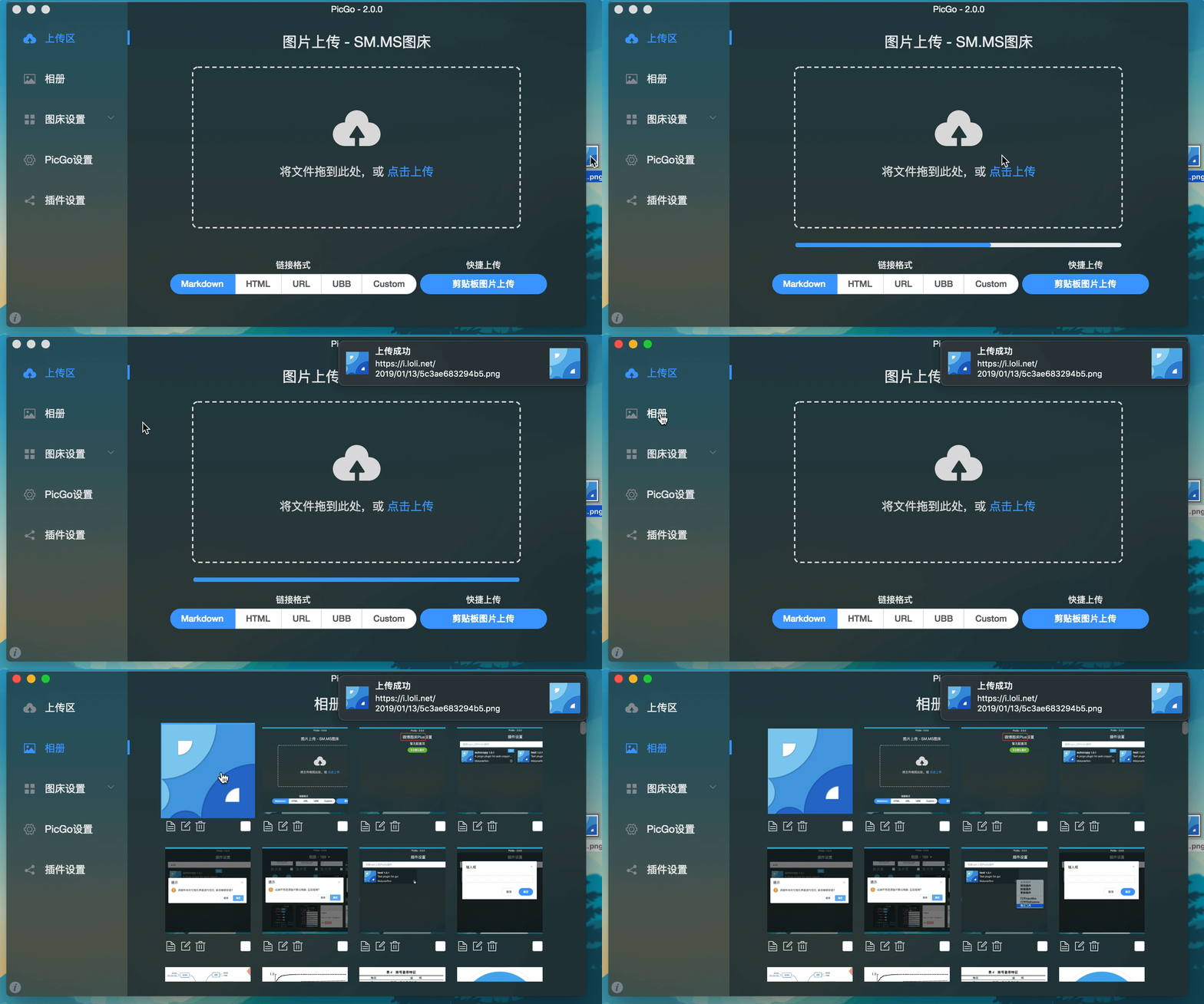
|
||
|
||
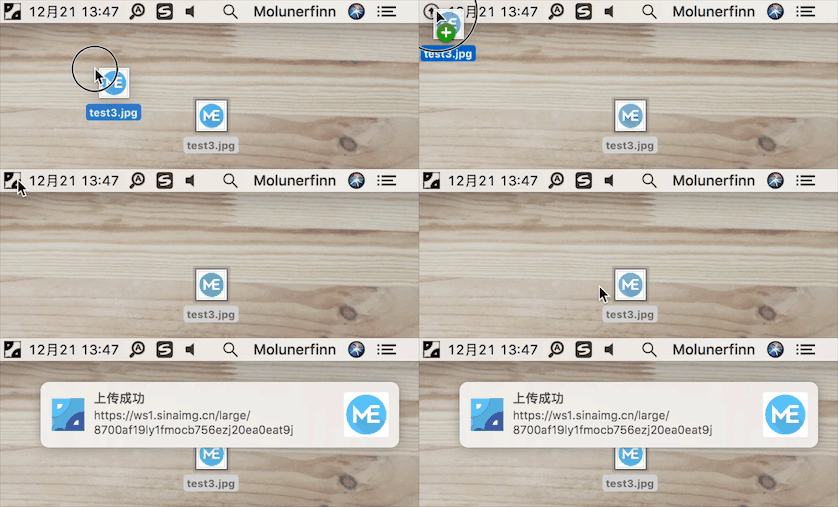
|
||
|
||
## Development
|
||
|
||
> Currently tested on macOS and Windows only. Linux has not been fully tested.
|
||
|
||
If you want to learn, contribute, modify, or build PicGo yourself:
|
||
|
||
> For an Electron-vue learning series, see: [Electron-vue development](https://molunerfinn.com/tags/Electron-vue/)
|
||
|
||
1. Install Node.js and Git, and make sure you’re familiar with npm basics.
|
||
2. Clone the repo: `git clone https://github.com/Molunerfinn/PicGo.git` and enter the directory.
|
||
3. Install dependencies with `pnpm`. If you don’t have it yet, install it from the [pnpm website](https://pnpm.io/installation) first.
|
||
4. On macOS you’ll need Xcode; on Windows you’ll need Visual Studio.
|
||
5. For contributing, see [CONTRIBUTING.md](./CONTRIBUTING.md).
|
||
|
||
### Development mode
|
||
|
||
Run `pnpm run dev` to start the dev workflow with hot reload. Note: dev mode can be unstable and the process may crash—if that happens:
|
||
|
||
```bash
|
||
ctrl+c # stop dev mode
|
||
pnpm run dev # restart
|
||
```
|
||
|
||
> On Windows, after dev mode starts, PicGo’s tray icon will appear in the bottom-right system tray area.
|
||
|
||
### Production build
|
||
|
||
To build release artifacts locally, run `pnpm run build`. After a successful build, the installer files will be generated under `dist`.
|
||
|
||
**Note**: If your network is unstable, `electron-builder` may fail to download Electron binaries. You can set an alternative mirror before building:
|
||
|
||
```bash
|
||
export ELECTRON_MIRROR="https://npmmirror.com/mirrors/electron/"
|
||
# On Windows: set ELECTRON_MIRROR=https://npmmirror.com/mirrors/electron/ (no quotes)
|
||
pnpm run build
|
||
```
|
||
|
||
Electron binaries are stored under `~/.electron/`. If you need to refresh them, delete that directory and rebuild.
|
||
|
||
## Related Projects
|
||
|
||
- [vs-picgo](https://github.com/PicGo/vs-picgo): PicGo for VS Code.
|
||
- [flutter-picgo](https://github.com/PicGo/flutter-picgo): mobile app (Android & iOS).
|
||
- [PicHoro](https://github.com/Kuingsmile/PicHoro): another mobile app compatible with PicGo config (Android only for now).
|
||
|
||
## Sponsorship
|
||
|
||
If you like PicGo and it helps your workflow, feel free to buy me a coffee.
|
||
|
||
Alipay:
|
||
|
||

|
||
|
||
WeChat Pay:
|
||
|
||

|
||
|
||
GitHub Sponsors:
|
||
|
||
[](https://github.com/sponsors/Molunerfinn)
|
||
|
||
## License
|
||
|
||
[MIT](http://opensource.org/licenses/MIT)
|
||
|
||
Copyright (c) 2017 - Now Molunerfinn
|